
Picture this scenario: Your team lead is asking for checks on every commit. Then the Security team announces new requirements for every code commit. What was supposed to be a simple workflow becomes an endless pile of manual tasks straining your mental load.
1. Execute unit tests before pushing
2. Check for accidentally committed secrets
3. Format code according to team standards
4. Verify dependencies are properly pinned
5. Run static analysis tools
Each requirement individually seems reasonable, but collectively they create checklist fatigue. Developers now have a mental burden of remembering and manually executing multiple steps before every commit. This isn’t sustainable, and it’s not fair to expect perfect adherence. Developers aren’t resistant to quality; they’re resistant to manual, repetitive tasks.
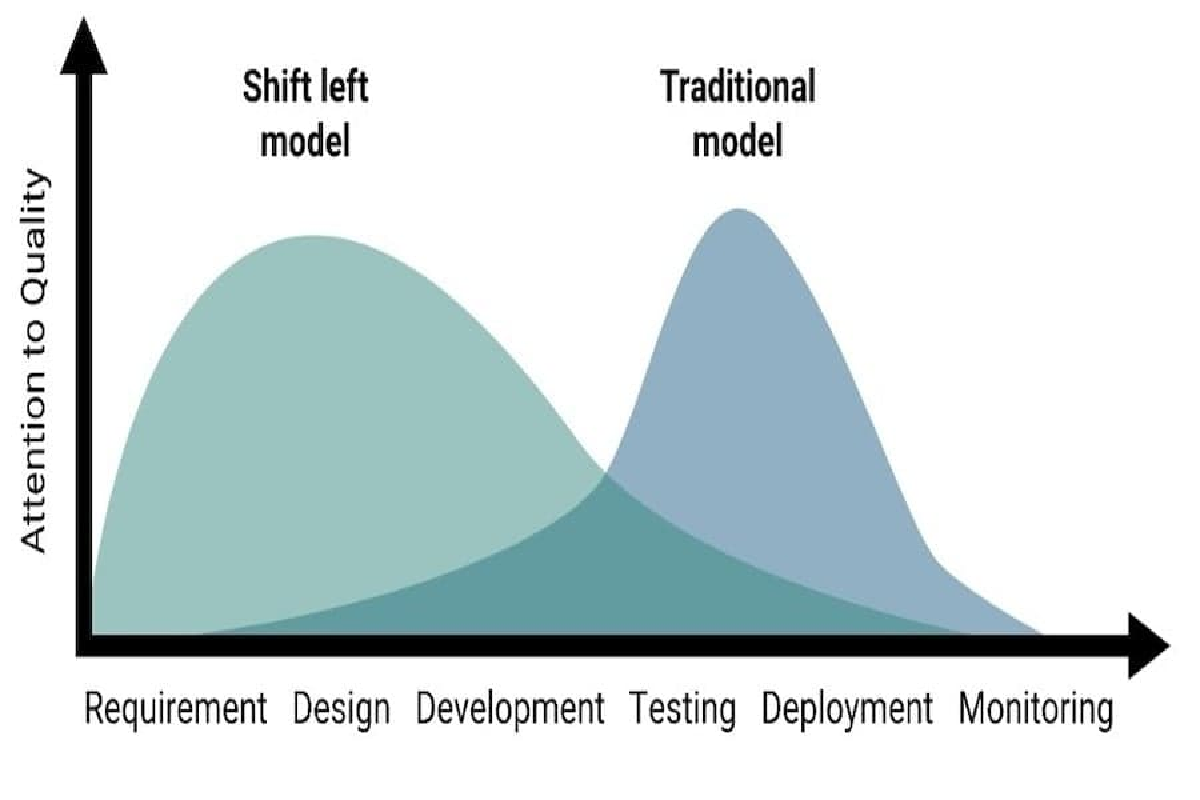
Research consistently shows that bugs found during development cost a fraction of bugs discovered in production. Some studies suggest the multiplier can be 100x or more. The challenge becomes: how do we enforce quality without adding friction?
Git Hooks: The Hidden Automation Layer#
Most developers know git has hook sample files sitting in .git/hooks that rarely get touched. These hooks are essentially event listeners that run scripts at key moments in the git lifecycle.
The beauty of hooks is they’re automatic. When configured, they execute without any conscious effort from the developer. But native git hooks have problems:
- They’re not tracked in version control
- Distribution requires manual setup
- Updates are a coordination nightmare
- Multi-repo management is painful
Modern Hook Management Solutions#
Several frameworks emerged to solve the git hook distribution problem. Here’s what they typically provide:
- Centralized configuration - One file defining all hooks
- Version control integration - Configuration lives in your repo
- Simple installation - One command gets developers running
- Cross-language support - Works with any programming language
- Hook composition - Multiple tools can run in sequence
Popular options include:
- Pre-Commit written in Python
- Husky written in JavaScript
- Lefthook written in Go
- and several others
They all solve similar problems with slightly different philosophies. My go-to tool is Pre-Commit because my programming language of choice is typically Python. Although Pre-Commit is not limited to the Python ecosystem and can be used in the context of other languages.
Building Your Hook Strategy#
Rather than showing generic examples, let me share the progression I recommend based on real implementation experience:
Phase 1: Start with Quick Wins:
Begin with non-controversial linting that is almost universally accepted. These run in under a second and catch common accidents without disrupting flow.
- Remove trailing whitespace
- Ensure files end with newlines
- Check MD/JSON/TOML/YAML syntax
- Prevent large file commits
Phase 2: Add Secret Scanning:
Once the team is comfortable with the concept, add secret detection. This is where real value starts showing:
- Include a secret scanning toolSecret scanning tools are the ideal first security use of pre-commit hooks. Tools such as GitGuardian, Trufflehog, and Gitleaks can scan commits for patterns matching API keys, passwords, tokens, and other credentials. A secret caught locally has fewer chances of entering the repository’s commit history, making remediation much easier and less impactful.
Phase 3: Language-Specific Quality:
At this point, the team should start using the associated pre-commit hooks regularly with limited impact while generating better quality. The next focus should be on improving code quality:
- Include minimal unit testing steps
- Standardize commit messages
- Restrict git workflows to certain agreed-upon conventions
Phase 4: The Heavy Hitters:
Finally, consider adding longer and more complex steps once pre-commit hook adoption is fairly high.
- Larger and longer test suites
- Opinionated security toolchain
- Serious SAST tools for code quality
- Dependency vulnerability scans
- License compliance checks
These might take longer, so consider running them only on changed files, allowing manual triggers instead of running on every commit, and being considerate of large codebases.
The CI Safety Net#
A critical principle is that hooks are developer helpers, not enforcers. Developers can always bypass hooks with git commit --no-verify. That’s by design, since certain emergencies might require quick commits that bypass agreed-upon conventions.
That’s where the CI pipeline comes into play, catching anything that was bypassed during local validation. This creates a healthy dynamic:
- Hooks catch 95% of issues locally (fast feedback)
- CI catches the remaining 5% (enforcement)
- Developers learn from CI failures what hooks prevented
- The value of local hooks becomes self-evident
Developer Resistance#
Real talk: some developers will resist. Common objections and responses:
“It slows me down”:
- Profile your hooks—keep total time under 5 seconds
- Use faster framework alternatives
- Make expensive checks manual or CI-only
“I need to commit work in progress”:
- That’s what
--no-verifyis for - Consider allowing WIP commits on feature branches
- CI still catches issues before merging
“The linter is wrong”:
- Configuration files let you customize rules
- Some checks can be suppressed with inline comments
- Regularly review rules with the team
- Allow team members to suggest rule changes
“This breaks my workflow”:
- Listen and adapt; the goal is enablement, not obstruction
- Different hooks for different branches
- Allow team-specific configurations
- Sometimes workflow changes are necessary
Measuring Success#
How do you know if your hook implementation is working? Monitoring and tracking are essential. Consider measuring and tracking the following:
- Reduction in CI failures - Fewer builds broken by preventable issues
- Time saved - Less context switching from CI feedback
- Developer adoption - How many devs install hooks voluntarily
- False positive rate - Are hooks annoying or helpful?
- Security incidents - Decline in committed secrets
Code Sample#
Here’s a quick example of the .pre-commit-config.yaml hooks configuration used in the repository containing this blog.
---
# pre-commit install --allow-missing-config
# pre-commit autoupdate
# pre-commit run --all-files --color auto
exclude: |
  (?x)^(
    \.pre-commit-config\.yaml$
  )
fail_fast: true
default_stages:
  - pre-commit
default_install_hook_types:
  - commit-msg
  - pre-commit
repos:
  - repo: meta
    hooks:
      - id: identity
        name: "meta | pre-commit hooks"
  - repo: https://github.com/commitizen-tools/commitizen
    rev: v4.13.9
    hooks:
      - id: commitizen
        name: "commitizen | validate commit messages"
        stages:
          - commit-msg
  - repo: https://github.com/gitguardian/ggshield
    rev: v1.48.0
    hooks:
      - id: ggshield
        name: "security | scan for secrets"
  - repo: https://github.com/pre-commit/pre-commit-hooks
    rev: v6.0.0
    hooks:
      - id: check-added-large-files
        name: "git | block large files"
        args: [--maxkb=2048]
      - id: check-json
        name: "general | check JSON files"
      - id: check-toml
        name: "general | check TOML files"
      - id: end-of-file-fixer
        name: "general | fix end of file"
      - id: mixed-line-ending
        name: "general | fix line ending"
        args:
          - --fix=auto
      - id: trailing-whitespace
        name: "general | remove trailing whitespace"
      - id: pretty-format-json
        name: "general | prettify JSON files"
        args:
          - --autofix
          - --no-ensure-ascii
  - repo: https://github.com/igorshubovych/markdownlint-cli
    rev: v0.48.0
    hooks:
      - id: markdownlint
        name: "md | lint: run markdownlint-cli"
        args:
          - --config
          - .config/.markdown-lint.yml
        exclude: |
          (?x)
          ^.github/instructions/.*|
          conf/slides/.*|
          ^CHANGELOG.md|
          ^docs/legacy.*||
          ^README.md
  - repo: https://github.com/adrienverge/yamllint
    rev: v1.38.0
    hooks:
      - id: yamllint
        name: "yaml | lint: run yamllint"
        args:
          - -c
          - .config/.yaml-lint.yml
  - repo: local
    hooks:
      - id: pin-github-action
        name: "security | gh-action: pinned sha"
        verbose: true
        files: ^\.github/workflows/[^/]+\.ya?ml$
        entry: "pin-github-action ."
        args:
          - --allow
          - "irishlab-io/*"
        language: node
        additional_dependencies:
          - [email protected]
Wrapping Up#
Implementing automated quality checks through hooks represents a fundamental shift in how we think about code quality. Instead of relying on developer memory and discipline, we build quality into the workflow itself.
The journey from manual checklists to automated validation takes time and iteration. Start small, prove value, and expand gradually. Focus on developer experience—if hooks feel helpful rather than obstructive, adoption follows naturally.
Most importantly, remember that hooks are a means to an end. The goal isn’t running hooks—it’s shipping quality code efficiently. Keep that focus, and your implementation will succeed.
References#
- OWASP DevSecOps Guideline
- Le “Shift-Left” en pratique: Intégrer la sécurité avec les pre-commit hooks
Additional Resources#
This post draws from experiences implementing quality automation across aerospace and financial services organizations. For a hands-on demonstration of these concepts, check out the pyquiz repository which provides practical examples of hook implementation.
Have questions about implementing hooks in your organization? The concepts discussed here are language and framework agnostic—the principles apply universally.